

A liquidation pallet inspection turns a delivered load into documented inventory. Before merchandise reaches a sales floor, online listing or repair bench, a reseller needs to establish what arrived, what condition it is in and whether anything differs from the order description.
The most effective process starts before delivery and continues through staging, counting, testing, grading and discrepancy reporting. It preserves evidence without holding up the entire load. It also separates ordinary as-is variability from issues that may warrant review under the applicable terms.
This guide explains an intake workflow for independent resellers receiving manifested or category-level pallets and full truckloads from PalletCove Liquidation. All merchandise is sold as-is for resale; an inspection does not establish guaranteed condition, resale value or profit.
1. Understand what your load description actually means
A liquidation pallet is a grouped shipment of merchandise sold in bulk. A truckload groups inventory at a larger scale, often requiring full-trailer receiving capacity. Neither term establishes item condition, completeness or testing status by itself.
Review the liquidation overview and types of liquidation pallets when comparing unfamiliar descriptions. The important distinctions are:
- Manifested inventory: A supplied list identifies merchandise, quantities or other fields. Check whether quantities are exact or estimated and whether the document describes individual units, cases or sets.
- Category-level inventory: The listing describes a merchandise category or assortment rather than necessarily providing a unit-by-unit manifest. Do not assume an itemized list exists.
- Customer returns: Previously purchased and returned goods. Packaging, use, functionality and accessory completeness can vary.
- Overstock: Excess inventory. This designation alone does not establish that every package is pristine or every unit has been tested.
- Shelf pulls: Goods removed from selling locations, potentially with labels, handling wear or packaging damage.
- Salvage: Inventory that may require repair, parts recovery or appropriate disposal. Never presume it is sale-ready.
A condition grade is the seller’s stated classification, not a universal industry standard. Read its definition on the specific listing. Browse liquidation pallets with those distinctions in mind, and retain the description that applied when you ordered.
2. Build the inspection plan before ordering
Match your receiving resources to the merchandise. General merchandise inventory may require several testing stations, while truckload inventory requires enough space to keep pallets and their records separate.
Product descriptions also shape the checklist. When evaluating the Bulk Hamilton Beach Truckload, consider appliance identification, accessory checks and safe functional testing. For the Macy’s Textile Truckload, plan for measurements, fabric inspection and set completeness. These are inspection considerations, not assertions about any particular shipment’s contents or condition.
PalletCove is an independent reseller and is not affiliated with, endorsed by or sponsored by any retailer named.
Before paying:
- Save the listing, manifest if provided, invoice and stated condition definitions.
- Confirm the order unit: pallet, case, individual item or truckload.
- Review reporting deadlines, required evidence and applicable exclusions.
- Resolve unclear descriptions and receiving requirements with the order desk.
- Assign staff and equipment for unloading, counting and testing.
PalletCove accepts credit/debit card, ACH bank transfer and domestic bank wire. Sales tax on qualifying orders is covered by PalletCove. Keep your resale certificate available if requested for qualifying business documentation; it is not a substitute for inventory records.
Free shipping is the only delivery option on every order to all 48 contiguous states, and freight is included in the listed price. Handling takes 1–3 business days after payment clears; transit is typically 3–7 business days from Dallas. Use these ranges for planning, not as a guaranteed appointment.
The same shipping framework applies to liquidation pallets in Texas and liquidation pallets in Florida. Review the shipping policy and confirm site suitability before dispatch. Pallet shipments may move by LTL, meaning less-than-truckload freight; a full trailer requires a receiving plan appropriate to its size and unloading arrangement.
3. Stage a safe receiving and inspection area
Set aside enough room to photograph the shipment before breaking it down. Keep delivered inventory separate from existing stock so shortages and substitutions are not obscured by commingling.
Create clearly labeled zones:
- Unopened receiving: Pallets awaiting exterior documentation.
- Count and identification: Items being matched to purchase records.
- Testing: Suitable benches, outlets and equipment for the category.
- Hold or quarantine: Damaged, suspect, recalled or unresolved merchandise.
- Released inventory: Units with completed records and approved internal grades.
Prepare a camera, labels, scanner if useful, spreadsheet, tape measure and appropriate protective equipment. Use trained operators for material-handling equipment. Keep aisles clear and avoid stacking unstable cartons.
Create an intake ID tied to the order, then give each pallet a unique identifier such as P01 or P02. Use those identifiers in photographs, count sheets and discrepancy reports. This small step becomes especially important when several pallets contain similar merchandise.

4. Document the shipment before and during unloading
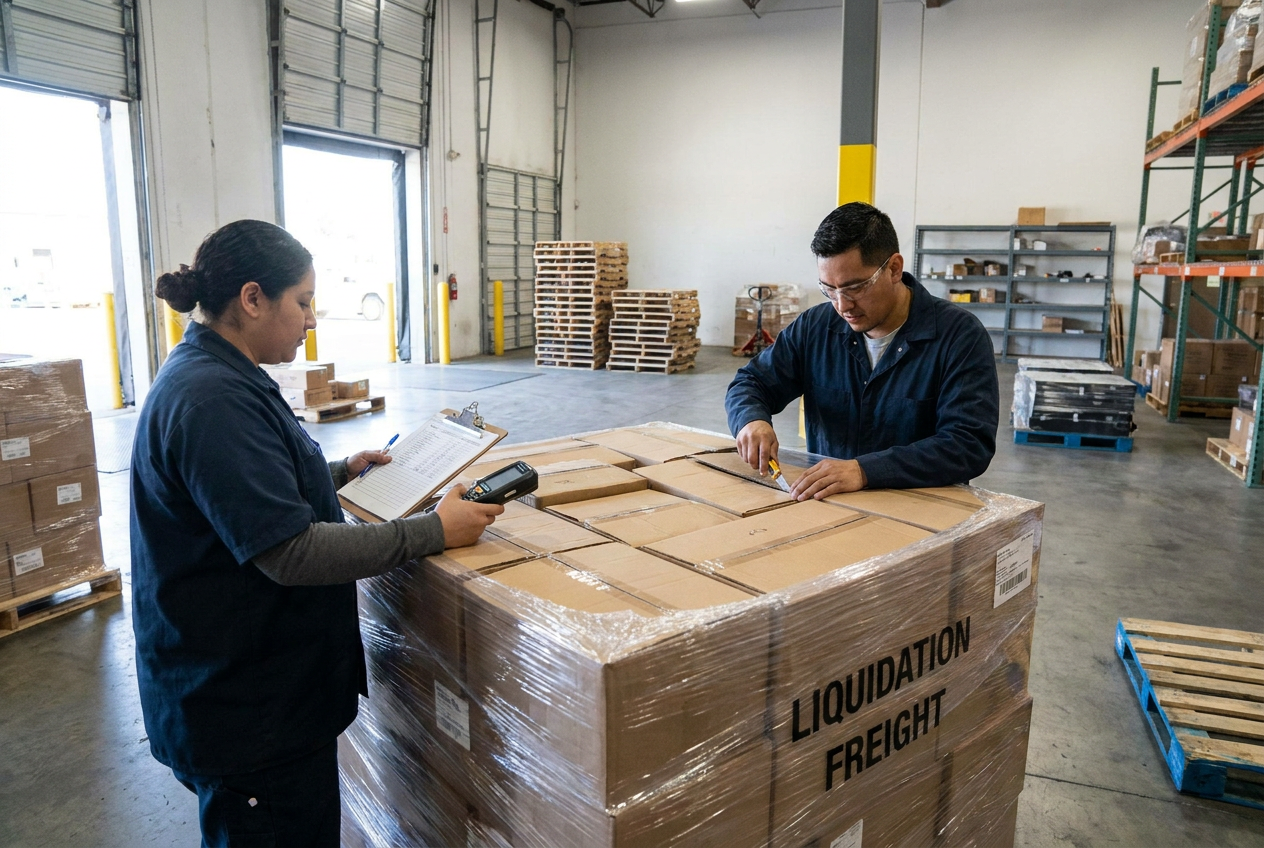
Delivery-day inspection starts with the shipping units, not the individual products. Compare the shipment identifiers and visible pallet count with the delivery paperwork and your order records.
Before removing wrap, photograph:
- Each pallet from multiple sides, including its top where safely accessible.
- Shipping labels, pallet identifiers and any visible seals.
- Leaning stacks, torn wrap, crushed cartons, punctures or moisture.
- Gaps or exposed areas that may help explain a later discrepancy.
Record specific observations on the delivery receipt where possible. “Pallet P02: two lower cartons crushed, wrap torn on right side” is more useful than “damaged.” Keep a copy of the receipt and note the arrival time. If a driver cannot wait for detailed inspection, document the exterior promptly and continue the unit-level review after unloading.
A pallet count is not a merchandise count. Signing for three pallets does not establish that every expected item inside them is present or functional.
Do not assume that a receipt notation automatically opens a claim or guarantees a remedy. If damage makes unloading unsafe, pause and seek instructions rather than improvising. Preserve cartons, wrapping and labels associated with any issue.
5. Count merchandise and reconcile the manifest
Open one pallet at a time, photographing significant discoveries before moving the affected items. Record actual quantities independently before adjusting your worksheet to match expectations.
For manifested loads, match by SKU, UPC, model number or another reliable identifier. Descriptions alone may confuse similar colors, capacities or product generations. The guide to reading a liquidation manifest explains how to approach unfamiliar fields.
Use a reconciliation table like this:
| Field | What to record | Why it matters |
|---|---|---|
| --- | --- | --- |
| Order and pallet ID | Invoice reference and P01, P02, etc. | Connects evidence to its source |
| Product identifier | SKU, UPC, model and serial where relevant | Separates similar merchandise |
| Expected quantity | Listing or manifest quantity, with unit basis | Establishes the comparison |
| Received quantity | Physical count using the same unit basis | Reveals possible discrepancies |
| Condition and completeness | Visible damage, accessories, packaging | Supports testing and grading |
| Evidence reference | Photo filename and test record | Makes review easier |
Check whether a manifest line means one case, one multipack or one individual item. Recount apparent shortages and inspect neighboring cartons before reporting them. Track unexpected items separately rather than treating them as automatic replacements for missing merchandise.
For category-level loads without an itemized manifest, build a received-inventory list and compare it only against explicit listing commitments. Do not create an expected SKU mix from sample photographs or assumptions.
6. Test safely and record the limits of each check
Start with a visual safety screen. Do not energize equipment with exposed wiring, liquid intrusion, damaged plugs or swollen batteries. Isolate suspect merchandise and use qualified help where appropriate. Check relevant recall information before releasing products for resale.
Testing should answer a defined question. “Powers on” is narrower than “fully functional,” and a successful startup does not prove every feature works.
Match testing to the merchandise
- Electronics: Confirm model, power requirements, startup, display, controls and relevant ports. Check for account locks and personal data; handle data securely before resale.
- Small appliances and tools: Check housings, cords, guards and required accessories. Follow manufacturer instructions and use qualified testing where hazards warrant it.
- Textiles and apparel: Check size labels, measurements where needed, seams, stains, odors and completeness of sets.
- General merchandise: Inspect breakage, missing hardware, instructions and basic operation appropriate to the item.
Record the date, tester, procedure and result. Use precise language: “display illuminates; charging not tested” or “set contains three of four listed pieces.” Keep untested units separate from passed units.
If the load is too large to test immediately, prioritize visible problems and items with longer diagnostic requirements. Sampling can inform workload planning, but it cannot establish the condition of every untested unit. Report discovered issues within the applicable deadline rather than waiting for exhaustive testing.
7. Assign internal grades and release inventory carefully
Separate the supplier’s load description from your own item-level resale grade. A mixed customer-return pallet can contain units with very different findings.
Use written internal definitions, for example:
- Inspected, no visible use: Describe packaging and testing separately; appearance does not prove an item is new.
- Tested working: State the functions tested and disclose cosmetic defects or missing accessories.
- Incomplete: Identify missing components and whether safe operation is possible.
- Untested: Make no functional claim.
- Repair or parts: Describe the known fault without suggesting assured repairability.
- Quarantine: Do not list until safety, recall or identification concerns are resolved.
Attach a unit ID or bin location to each inventory record. Store accessories with the correct product, and retain serial-number records where relevant. Release only merchandise whose descriptions can be supported by your inspection notes.
8. Submit discrepancies within the applicable claim window
There is no universal liquidation claim deadline. Consult the terms attached to your purchase and the refund policy for the applicable window, its starting event, submission method and evidence requirements. If any point is unclear, request clarification before ordering and promptly upon discovery of an issue.
All merchandise is sold as-is for resale. Ordinary condition variation may be consistent with the purchase description; a documented shortage or listing mismatch requires its own review. Reporting an issue does not guarantee a return, replacement, credit or refund.
Document first, report promptly and preserve the affected merchandise: a complete inspection is useful only if relevant evidence reaches the right desk on time.
A useful submission includes:
- Order number, delivery date and affected pallet IDs.
- The saved listing or manifest showing the disputed expectation.
- A concise expected-versus-received comparison.
- Exterior photos, item photos and relevant identifiers.
- Delivery-receipt notes and test results where applicable.
- A clear request for review and next-step instructions.
Keep the original submission and timestamp. Ask whether additional evidence is needed, and do not assume follow-up correspondence extends the deadline. Retain affected items and packaging until instructed otherwise; do not ship merchandise back without authorization.
Common mistakes include discarding packaging, mixing loads before counting, testing unsafe products, confusing cases with units and waiting until the entire truckload is processed before reporting a discovered issue. Avoid unsupported labels such as “all defective” when only a sample was examined.
Frequently asked questions
How soon should I begin liquidation pallet inspection?
Begin exterior documentation at delivery and unit-level inspection as soon as the shipment is safely staged. Schedule counting and testing around the applicable reporting deadline, not around when you expect to start selling.
Does a manifest guarantee every item works?
No. A manifest identifies inventory according to its stated fields and qualifications; it is not automatically a functional test report. Read the condition description and document each unit’s actual testing status.
What if concealed damage appears after the driver leaves?
Photograph the item, its carton and surrounding packaging before changing their condition further. Record when you discovered the damage and submit it through the applicable reporting process promptly; review remains subject to the purchase terms.
Can I return a pallet because some customer returns do not work?
Do not assume so. PalletCove merchandise is sold as-is for resale, and nonworking items may be consistent with the stated load description. Consult the applicable policy and obtain instructions before returning anything.
Should every item be tested before resale?
Use checks appropriate to the product’s risks and the claims you intend to make. If an item remains untested, describe it accurately rather than presenting it as working; unsafe or unresolved recalled merchandise should not be released for sale.
Talk to PalletCove Liquidation
Confirm listing details, receiving requirements and discrepancy-reporting instructions before placing your next order. You can contact our order desk with questions or review current inventory.
- Business: PalletCove Liquidation LLC
- Address: 4820 Cove Industrial Blvd, Dallas, TX 75236
- Phone: (713) 819-3904
- Email: sales@palletcoveliquidation.com
- Hours: Mon–Fri 8:00 AM – 6:00 PM CT, Sat 9:00 AM – 2:00 PM CT, Sun closed