

Data wiping used electronics is a release-control process, not simply a factory-reset button. A returned laptop, phone, printer or smart device may retain personal files, saved credentials, network settings or an account association that prevents its next owner from using it.
For independent resellers, the goal is a documented decision for every data-bearing item: sanitized and eligible for further testing, held for authorized resolution, or routed away from resale. Start with our guide to buying liquidation pallets for the broader purchasing process; this workflow focuses on what must happen before an electronic device becomes sellable inventory.
Sanitization means making access to stored target data infeasible using a method appropriate to the media and risk. It does not prove that the device works, remove every ownership lock or establish that you have permission to bypass security.
1. Buy for the processing capacity you actually have
A liquidation pallet is a grouped wholesale lot; a truckload is a larger shipment that can involve a full trailer. Either can contain data-bearing merchandise. Compare available liquidation pallets with the planning considerations in buying liquidation truckloads before committing more equipment than your team can securely process.
A manifest is the seller’s inventory description, not a sanitization certificate. Check quantities, model identifiers, stated accessories and exceptions, while recognizing that the listing determines what information is available. A condition grade describes the seller’s stated merchandise condition; grading conventions are not universal.
- Customer returns: May contain prior-user data, damaged storage or unresolved accounts.
- Overstock: Describes inventory status, not automatically verified new condition or an absence of data.
- Shelf pulls: May include display or handled merchandise; verify the actual description.
- Salvage: May be unsuitable for repair or safe power-on, while still containing readable storage.
- As-is: Signals a condition qualification in the offer, not proof of data clearance or a replacement for applicable claims terms.
The general merchandise category and truckload category are places to review current descriptions, not promises of electronics content. Likewise, evaluate the actual listings for the Amazon General Merchandise Truckload and WM GM Truckloads Pallets; do not assume either includes particular devices, tested units or sanitized storage. PalletCove is an independent reseller and is not affiliated with, endorsed by or sponsored by any retailer named.
Build a pricing strategy—a repeatable approach to setting selling prices and purchase limits—that includes intake labor, sanitization tools, replacement storage, functional testing and secure disposal. Divide the total processing budget by realistically releasable units, not simply the manifest count. Do not assign resale revenue to unresolved locked devices.
2. Plan ordering, delivery and secure intake
Before ordering, confirm the listed condition, manifest availability and any stated claims process. Payment methods are those shown at checkout: card via a secure payment link, ACH, bank wire and the listed payment apps. Valid resale certificates are reviewed and applied where the buyer’s state allows.
Free shipping is the only delivery option on every order to all 48 contiguous states, and freight is included in the listed price. This applies to buyers exploring liquidation pallets in Texas and liquidation pallets in Florida alike. Pallet shipments may move by LTL, meaning less-than-truckload transportation; larger shipments may use a full trailer.
Handling takes 1–3 business days after payment clears. Transit from Dallas is typically 3–7 business days, for an estimated 4–10 business days total. The processing cutoff is 2:00 PM Central Time, America/Chicago, Monday–Friday; after-cutoff confirmations begin the next business day. Weekends and applicable holidays do not count.
At delivery, photograph packaging and visible damage, reconcile the shipment against available documents and record discrepancies without opening personal files. Request delivery-issue reporting within 48 hours. Keep supporting photographs focused on packaging and equipment, not screens displaying customer information.
Under the Refund & Returns Policy, United States products explicitly listed as NEW ONLY qualify for defective and non-defective returns and exchanges within 30 calendar days of delivery. Returns are by mail; the customer is responsible for the return label and shipping, and a 15% product-price restocking fee applies. Refund processing is 10 calendar days after authorized return receipt and inspection, or approval where no physical return is required. Mixed and used loads have separate claims terms, not routine change-of-mind returns; the requested 48-hour delivery report does not shorten eligible new-product return rights.
3. Quarantine, identify and log every device
Sorting means separating inventory into controlled processing groups. Create a restricted-access intake area with clearly labeled statuses: unprocessed, sanitization in progress, failed or locked, and released. Nothing should move directly from an incoming carton to a sales bin.
Inspect for swollen batteries, liquid damage and exposed wiring before applying power. Do not charge or power unsafe equipment. Keep unknown devices off your business network; use isolated processing equipment and controlled connectivity only when necessary for approved procedures.
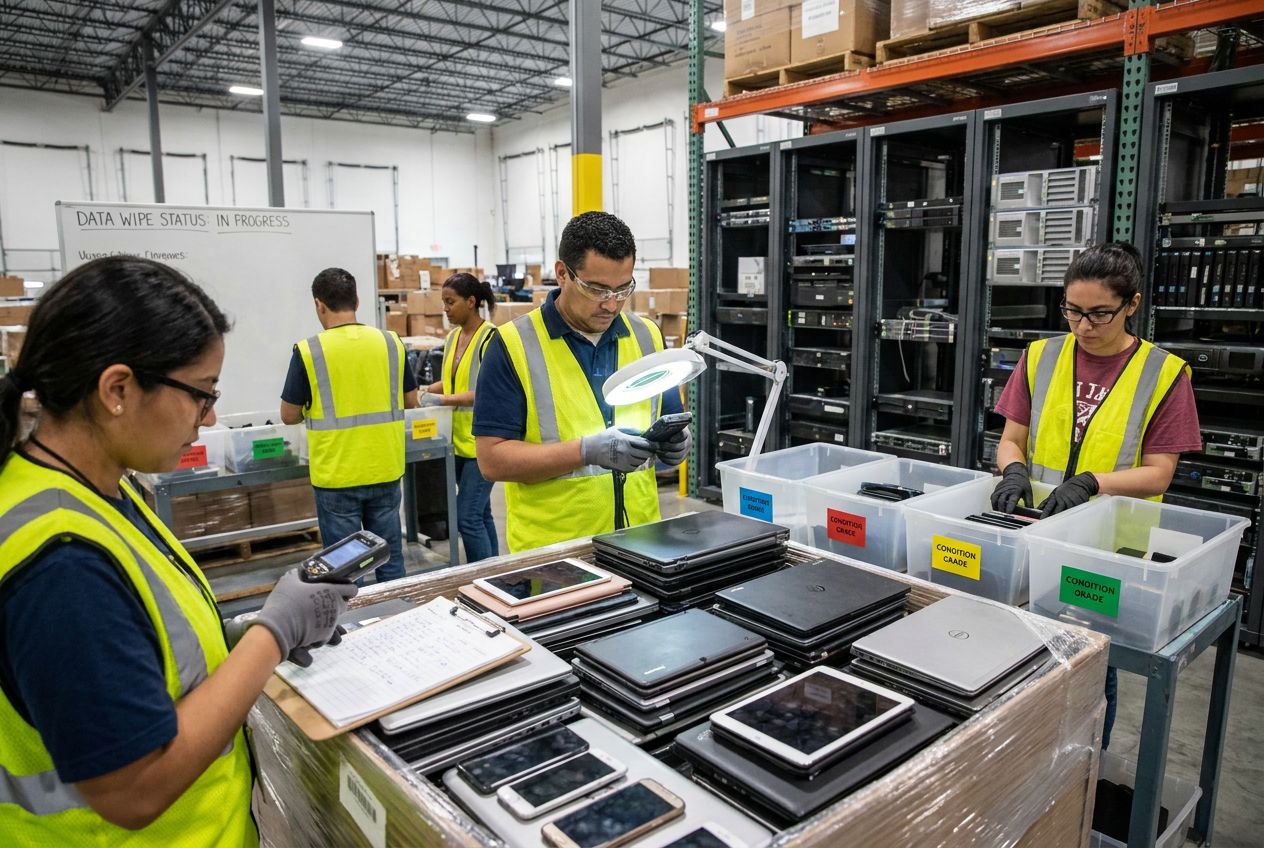
Assign an internal asset ID and link it to the source lot. Record serial numbers in restricted internal records rather than public listing photographs. Identify all potential storage: internal drives, secondary drives, memory cards, removable USB media and embedded flash.
| Record field | What to capture | Why it matters |
|---|---|---|
| --- | --- | --- |
| Identity | Asset ID, model, serial and source lot | Connects evidence to the correct device |
| Storage | Media type, capacity and identifiers where accessible | Helps prevent missed drives or cards |
| Initial status | Power condition and visible lock state | Determines the safe next action |
| Sanitization | Method, tool/version, operator and date | Makes the work traceable |
| Result | Completion status, errors and verification evidence | Separates success from attempted wipes |
| Disposition | Release, hold, media removal or destruction | Prevents accidental listing |
Do not inspect private photos, messages or documents to determine whether a device contains data. Treat unknown storage as data-bearing. If sensitive information appears incidentally, stop unnecessary access, restrict exposure and follow your incident-handling procedure.
4. Choose a method that fits the storage
Common sanitization terms distinguish clear, which addresses ordinary logical recovery; purge, which provides stronger protection against advanced recovery while potentially preserving reuse; and destroy, which renders media unusable. Use current NIST media-sanitization guidance and model-specific manufacturer instructions when writing your procedure. A tool’s marketing claim is not proof that a particular operation succeeded.
Hard drives and removable media
For a functioning magnetic hard drive, an approved full-media overwrite may meet a defined clearing requirement. A stronger requirement may call for a supported purge method. Deleting files, emptying the recycle bin, removing partitions or performing a quick format is not an adequate substitute.
Record the actual target drive and command result. If sectors are inaccessible, commands fail or the drive cannot be reliably addressed, do not treat the readable portion’s successful overwrite as clearance of the whole device.
Solid-state drives and embedded flash
SSDs use wear leveling and may have overprovisioned or remapped areas that ordinary overwrites cannot reliably reach. Prefer an appropriately supported device sanitize or secure-erase procedure whose scope meets your requirement. Confirm the drive, controller and connection support the operation; some adapters block the necessary commands.
Cryptographic erase can be appropriate when its prerequisites are established, including suitable encryption protecting the relevant data and effective sanitization of the necessary keys. Do not assume that an encrypted-looking device, forgotten password or failed boot proves those prerequisites.
Phones, tablets and connected equipment
On supported modern phones and tablets, the manufacturer’s erase procedure may sanitize encrypted user storage. Follow the exact model’s instructions, then separately check activation and management status. Address removable cards, physical SIMs and stored eSIM profiles as applicable; do not pass a prior owner’s SIM to a buyer.
Printers, cameras, routers, game consoles and smart-home equipment may retain documents, recordings, credentials or account tokens. A settings reset may not erase internal document storage or removable media. When the sanitization scope cannot be established, keep the item on hold rather than guessing.
5. Separate account locks from data sanitization
An account lock is an ownership or access-control restriction, not necessarily remaining user data. Conversely, reaching an unlocked home screen does not demonstrate that storage has been sanitized.
Examples include activation locks, Android Factory Reset Protection, firmware passwords, organization enrollment and mobile device management, or MDM. Some management enrollment can reappear during setup even after storage is erased.
- Record the lock category without collecting credentials or unnecessary account details.
- Ask the authorized supplier or prior organization to resolve the association through official channels.
- Keep ownership documentation and correspondence with the asset record.
- After authorized release, repeat the relevant erase and verification steps.
- If release cannot be established, retain the hold or choose a controlled non-resale disposition.
Do not use bypass services, borrowed credentials or unofficial unlocking tools as substitutes for authorization. Do not contact a prior user using information found on the device. Even a successfully sanitized device should not be advertised as ready to activate while its ownership or management status remains unresolved.
A reset is an action; release for resale is a documented decision supported by sanitization evidence, lock checks and separate condition testing.
6. Verify results and control failed wipes
Verification checks whether the selected sanitization procedure completed as intended. Validation is the decision that the method and evidence are adequate for the device’s intended disposition. Assign a named person to approve release; use a second-person review for exceptions where practical.
Check completion logs, target identifiers and error reports. Perform method-appropriate checks prescribed by your procedure; a blank file browser alone is weak evidence. Restart the device and, where appropriate, use controlled connectivity to check for activation or organization-enrollment prompts without entering a customer’s credentials.

For failures, record the error and permitted next action. A limited retry may be reasonable after correcting an identified cable, power or tool issue. Repeated resets without understanding the failure are not verification.
If storage is removable, a qualified technician may remove it for controlled destruction and install replacement media. Record the removed media’s identity and downstream disposition. If storage is soldered in and cannot be sanitized, keep the data-bearing board or device out of ordinary resale. Use a qualified destruction provider and retain documentation tied to the media or asset; a generic recycling receipt alone may not establish data destruction.
7. Release to a channel only after all checks pass
Sanitization and functional testing require separate records. After sanitization, test appropriate functions, then remove test accounts and data through the approved final process. Screen for safety issues and use our product recall screening guide for resellers for the separate recall review.
A bin store sells merchandise from browsable bins, often on a scheduled price cycle. A flea market is a venue where independent vendors sell from stalls or tables. An online marketplace connects sellers and buyers through a digital platform. None is an appropriate destination for unprocessed data-bearing inventory.
Keep these items off ordinary sales listings:
- Devices with failed or undocumented sanitization.
- Units with unresolved ownership or organization locks.
- Equipment with unknown, inaccessible data-bearing storage.
- Unsafe batteries or unresolved recall restrictions.
- Devices whose advertised condition or activation status cannot be supported.
“Untested,” “as-is” and “for parts” do not cure a data-exposure problem. Sanitized, safe parts may have a legitimate channel, but only after applicable ownership and platform requirements are satisfied. Follow the separate eBay liquidation listing restrictions workflow before publishing there.
Describe the actual verified condition and remaining defects. Avoid publishing full serial numbers, account screens or wipe logs containing sensitive information. Starting a bin store, selling at flea markets, sorting and pricing inventory, handling unsellable items, and scaling from pallets to truckloads all depend on this same release gate; channel choice cannot replace it.
Frequently asked questions
Is a factory reset enough for used electronics?
Sometimes, when the manufacturer’s procedure appropriately sanitizes that model’s storage and you verify completion. It is not a universal method, and it does not necessarily remove activation locks, management enrollment or removable-media data.
Can I sell an account-locked phone for parts?
Do not use a parts label to bypass unresolved data or ownership concerns. Establish authorized disposition, sanitize or securely destroy data-bearing components, and check the intended channel’s restrictions before selling any eligible parts.
What if a device will not power on?
Assume its storage may still contain recoverable data. A qualified technician may be able to sanitize removable media separately; otherwise, use a controlled destruction route rather than releasing the data-bearing device.
Do I need a sanitization record for every device?
Use an asset-level record for every data-bearing device and account for each storage medium. Batch logs can support this process only when their results are reliably mapped to individual assets and exceptions are recorded.
Does sanitization mean the electronics are tested and ready to sell?
No. Sanitization addresses stored data, while functional testing, safety screening, account-release checks and accurate condition descriptions address different resale requirements.
Talk to PalletCove Liquidation
Build secure intake and documented release capacity before increasing purchasing volume. Revisit the liquidation pallet buying guide for broader sourcing decisions, then review current inventory against your ability to process the listed condition.
PalletCove Liquidation LLC is located at 4820 Cove Industrial Blvd, Dallas, TX 75236. For listing and ordering questions, contact our order desk, call (713) 819-3904 or email sales@palletcoveliquidation.com.
Hours: Mon–Fri 8:00 AM – 6:00 PM CT, Sat 9:00 AM – 2:00 PM CT, Sun closed.